Turnstile Token Required: What It Means and How to Fix It
The "Turnstile token required" error means that the form was sent without a Cloudflare Turnstile token. The site expects the token in the cf-turnstile-response field, but the field was empty or missing, so the server rejected the request before checking anything else.
The wording depends on the site: "Turnstile token required", "Turnstile token is required", "Please verify you are human" or the Cloudflare error code missing-input-response. They all mean the same thing: no token reached the server.
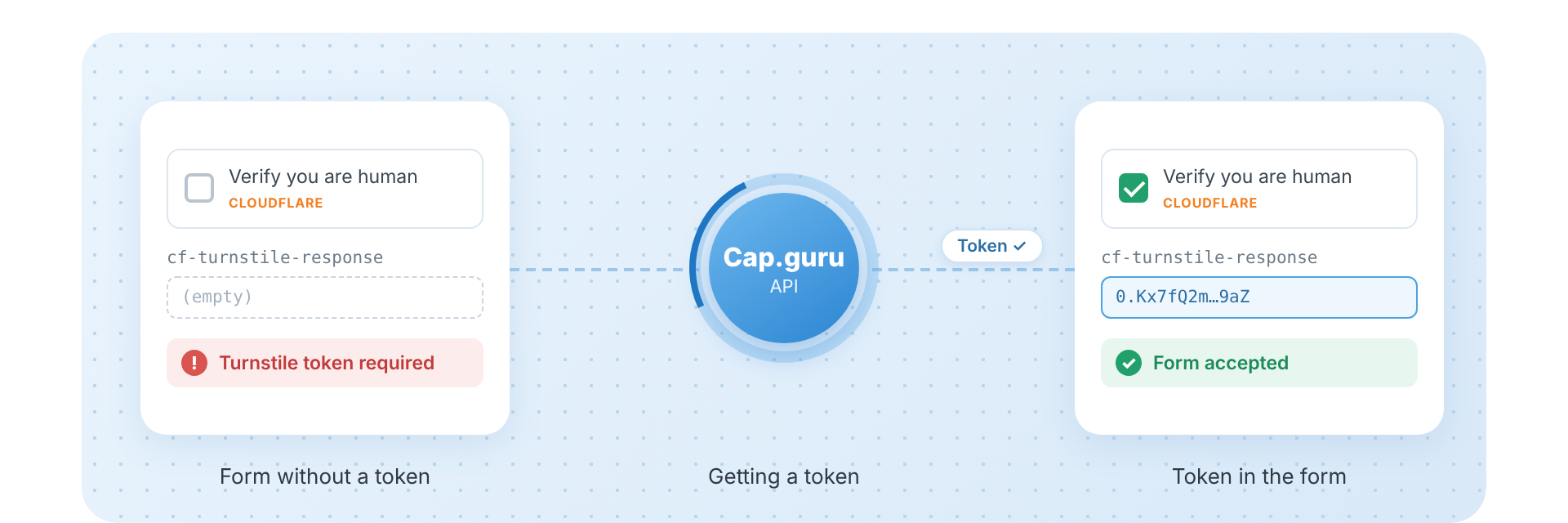
What Is cf-turnstile-response
- The page shows the Turnstile widget: a
divwith thecf-turnstileclass and adata-sitekeyattribute. - When the check passes, Turnstile writes the token into a hidden field named
cf-turnstile-responseinside the form. If the site setsdata-response-field-name, the field has that name instead. - The form is sent together with the token.
- The site server sends the token to Cloudflare (
siteverify) and gets a yes or no.
The error appears at step 3 or 4: the field is empty, or the token in it is no longer valid.
Why the Token Is Missing or Rejected
| Cause | What you see | How to fix |
|---|---|---|
| The form was sent before the check finished | Turnstile token required, missing-input-response | Wait until cf-turnstile-response has a value, then submit |
| The token was not put into the form | Same | Put the token into the cf-turnstile-response field of the same form |
| The token is older than 5 minutes | timeout-or-duplicate, invalid-input-response | Get a new token right before submitting |
| The token was already used | timeout-or-duplicate | A token works only once: get a new one for every submission |
| The token was issued for another site key or page | invalid-input-response | Use the data-sitekey and the URL of the page you submit |
| The site uses a callback instead of the form field | The form stays blocked, the button stays disabled | Call the function from data-callback with the token |
A Turnstile token is valid for 300 seconds (5 minutes) and is meant for one check. It can be up to 2048 characters long.
How to Find the Site Key
Open the page code (right click, View page source, or the Elements tab in DevTools) and search for cf-turnstile or data-sitekey:
<div class="cf-turnstile" data-sitekey="0x4AAAAAAAxxxxxxxxxxxxxx" data-callback="onTurnstileSuccess"></div>The value of data-sitekey is the site key. If the widget is created from JavaScript, search the scripts for turnstile.render and the sitekey option.
Fixing It in Automation
If a script, a test or an AI agent submits the form, the widget may never get a token by itself. You can get the token through the Cap.Guru API and put it into the form.
1. Get a token
import time
import requests

API_KEY = "YOUR_API_KEY"
SERVER = "https://api2.cap.guru"   # from Russia: https://api.cap.guru


def get_turnstile_token(sitekey: str, pageurl: str) -> str:
    r = requests.get(f"{SERVER}/in.php", params={
        "key": API_KEY, "method": "turnstile",
        "sitekey": sitekey, "pageurl": pageurl, "json": 1,
    }).json()
    if r["status"] != 1:
        raise RuntimeError(r["request"])
    task_id = r["request"]

    for _ in range(36):                       # up to 3 minutes
        time.sleep(5)
        res = requests.get(f"{SERVER}/res.php", params={
            "key": API_KEY, "action": "get", "id": task_id, "json": 1,
        }).json()
        if res["status"] == 1:
            return res["request"]
        if res["request"] != "CAPCHA_NOT_READY":
            raise RuntimeError(res["request"])
    raise TimeoutError("Turnstile token not ready")
2. Put the token into the form and submit
The token must be used within 5 minutes and only once:
// Run on the page (Playwright: page.evaluate, Selenium: execute_script)
(token) => {
  const field = document.querySelector('[name="cf-turnstile-response"]');
  if (field) field.value = token;

  const widget = document.querySelector('.cf-turnstile[data-callback]');
  const cb = widget && window[widget.dataset.callback];
  if (typeof cb === 'function') cb(token);
}
Then submit the form as usual.
Ready modules
You do not have to write this yourself. The Node.js module finds the site key, gets the token and puts it into the field and the callback with one call:
await solver.solveTurnstileToken();The MCP server does the same for AI assistants such as Claude and Cursor.
Still Getting the Error?
- The token is there, but the site still says it is required. The site may read the token from another field. Check
data-response-field-nameon the widget and the request in the Network tab of DevTools. - The error appears on every second submission. The token was reused. Get a new one for each submission.
- The token is rejected as invalid. Check that you sent the site key and the exact URL of the page with the form, not of another page.